Fast signal handling
Telegram messages are captured, parsed and converted into broker-specific commands with a low-latency execution path.

Connect the Telegram channels and groups you already follow to one or more MT5 accounts. Farronix receives, interprets and routes signals through your own Strategies — then keeps listening for the updates that matter.
Farronix does more than spot a BUY or SELL message. It keeps the original signal connected to the live trade, so later commands can be applied to the right position.
Telegram messages are captured, parsed and converted into broker-specific commands with a low-latency execution path.
Select the groups and channels you want to monitor without cluttering the console with every chat on your Telegram account.
Process SL and TP changes, break-even commands, partial closes, full closes and pending-order updates against existing trades.
Route one signal to several broker or prop-firm accounts while keeping each account's actual execution details separate.
Normalize GOLD to XAUUSD internally, then map it to XAUUSD, GOLD, XAUUSD.a or whatever each broker actually uses.
When a source says "Risk Free", the stop can move to the price your account actually filled — not merely the quoted signal entry.
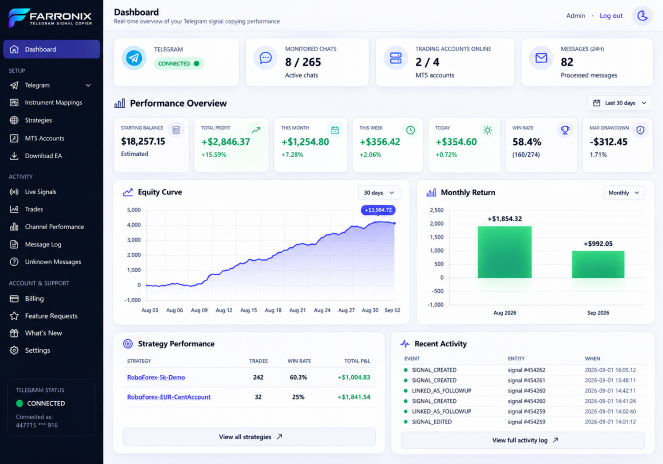
Change copier settings through the responsive cloud console instead of logging into the Windows server running MetaTrader.
See which Strategy accepted or blocked a signal and why, alongside the resulting broker command and execution outcome.
Authorise your Telegram account and choose the signal chats that matter.
Install the Farronix EA on each MetaTrader account and map any broker-specific symbols.
Choose sources, destinations, markets, lot sizes and limits independently for each Strategy.
Signals open on the accounts that pass your rules. Follow-up Telegram commands stay linked to the resulting trades.
Strategies let the same sources feed different accounts in different ways. Each Strategy evaluates the signal independently.
Sources: all selected groups
Sources: VIP + FX Premium
Use the same Telegram sources across multiple accounts, but control the execution per Strategy. A Gold signal might be 0.01 lots on one account and 0.10 on another, while a Forex-only Strategy ignores it completely.
3 Telegram sources
2 broker accounts
XAUUSD only · 0.01 lot
4 Telegram sources
1 broker account
Forex only · 0.03 lot
Same sources
Personal MT5
XAUUSD · 0.10 lot
Start with one MT5 account, then add additional broker or prop-firm accounts as you need them.
Everything needed to run the cloud copier with one MT5 account.
Add another MT5 account without buying a separate full subscription.
Same cloud console.
Give different accounts different Strategy rules, lot sizes and symbol mappings.
7-day free trial. Card required. Cancel before the trial ends and you won't be charged.
Pricing shown in USD. Taxes may apply where required. MT5 broker or prop-firm accounts are not included. Pricing is per connected MT5 trading account/licence — not per Telegram channel, Strategy or trade.
The copier is designed around keeping Telegram interpretation, Strategy decisions and each broker's actual trade separate — so the system remains flexible as your setup grows.
Your trial starts as soon as you register and activate it — a payment method is required upfront, but you are not charged until the trial ends. Cancel any time before then and you won't be billed.
No. The cloud service continues monitoring Telegram and the MT5 EA continues communicating with the service. The browser is simply your management console.
Yes. A Strategy can contain one or more Telegram sources and one or more MT5 accounts. You can also use the same source in multiple independent Strategies.
Yes. Strategies can apply their own fixed lot settings, with symbol-specific overrides where configured.
When configured as a break-even command, Farronix can move the stop to the actual execution price taken by each account rather than relying only on the entry quoted in Telegram.
The launch product supports MT5 only. MT4 is not currently available — the underlying architecture is being kept suitable for an MT4 EA to be added in a future release.
Yes. The cloud console is designed to be responsive so you can check signals, trades, Strategies and account status without remotely logging into the trading server.
Build the Strategies once, then manage your copier from anywhere.